
What is Bare Metal Programming in Embedded System?


What is Bare Metal Programming?
In the intricate realm of embedded systems, where precision and efficiency reign supreme, Bare Metal Programming emerges as a game-changing paradigm, most often structured around the foreground-background superloop architecture. Bare metal refers to writing software that runs directly on the CPU, with no operating system managing memory, peripherals, or task scheduling on its behalf. At InTechHouse, we embark on a journey through the core of this method, dissecting its workings, exploring its merits, and addressing its challenges. Join us as we delve into this bare metal programming guide, unraveling the secrets that empower developers to connect directly with the hardware and redefine the boundaries of embedded system development.
How Does Bare Metal Programming Work?
Bare Metal Programming eliminates the intermediary layers of operating systems, including the hardware abstraction layer most RTOS and Linux-based systems rely on, allowing developers to interact directly with the hardware. This approach provides unprecedented control, enabling efficient utilization of system resources and precise execution of tasks. Instead of calling into a library of device drivers, the developer writes the code that talks to peripherals directly, at the register level. Learn the intricacies of this method with InTechHouse as we navigate through its workings and unveil the unique advantages it brings to the table.
Benefits of Bare Metal Programming
1. Maximum Resource Utilization: Bare Metal Programming allows for optimal utilization of system resources since it eliminates the overhead associated with operating systems. This leads to faster execution times and reduced memory footprints.
2. Predictable Performance: With no operating system in the way, developers can achieve deterministic and predictable performance. This is crucial in applications where timing and responsiveness are paramount.
3. Reduced Complexity: Bare Metal Programming simplifies the development process by eliminating the need to navigate through layers of operating system abstraction, and our development guide shows how bare metal programming works in a real toolchain. This reduction in complexity streamlines the development cycle and facilitates faster time-to-market.
See also:
How Bare Metal Programming Works: Development Guide
Bare Metal Security: Implementing Secure Boot and Trusted Execution Environments (TEE)
Real Time Operating System in Embedded Systems
A Practical Bare Metal Programming Guide: From Toolchain to First LED Blink
Understanding bare metal programming in theory is one thing; getting a real ARM core to execute your first line of code is another. Here's what a typical development workflow actually looks like, from the very beginning.
Required Tools
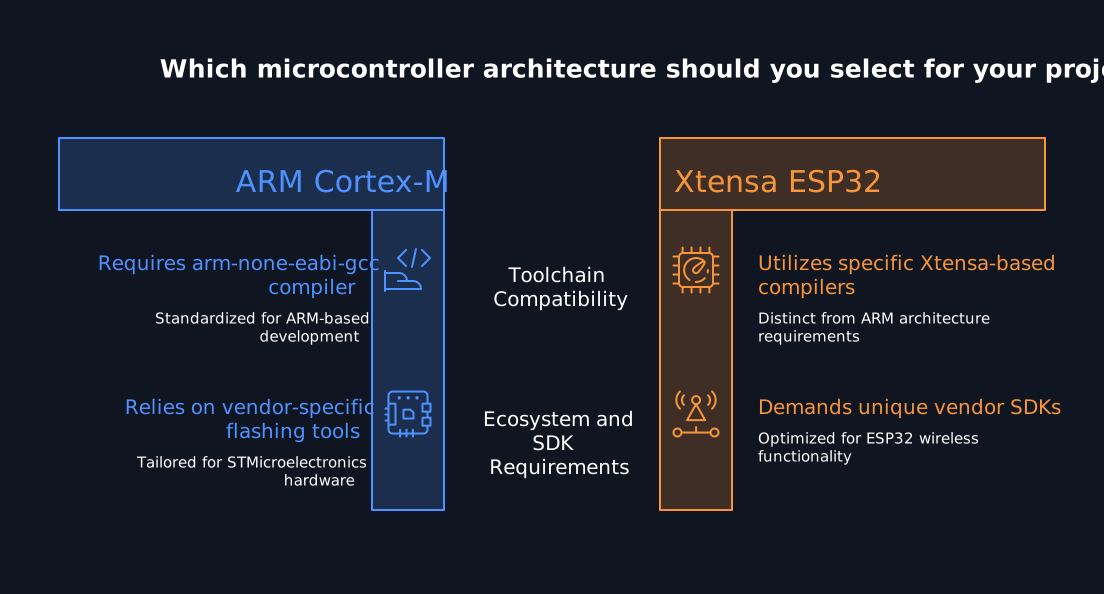
Before writing any source code, you'll need a few essentials: a GCC compiler targeting your microcontroller's architecture (typically arm-none-eabi-gcc for ARM Cortex-M devices), the datasheet and reference manual for your specific microcontroller, and a way to flash and debug the finished binary. For Linux, setting up the toolchain usually means executing a handful of terminal commands to install the ARM GCC package and any vendor-specific flashing tools before writing a single line of firmware.
Which toolchain you install depends on the silicon in front of you. An ARM Cortex-M part from ST and an Xtensa based ESP32 expect different compilers, flashing utilities and vendor SDKs, so it is worth reading our STM32 vs ESP32 comparison before committing to a setup. Picking the family first keeps the rest of this guide straightforward.
Every item on that list assumes the target part is already fixed, because the toolchain, the debug probe, and even the register names all follow from the chip you commit to. If that decision is still open, our guide to choosing the right microcontroller for embedded systems covers the memory, peripheral, and power trade-offs that come first. Settling it early saves rewriting the whole low-level layer later.
Startup Code and the Vector Table
The very first thing that runs on a microcontroller isn't your int main() function; it's startup code, generated either by a vendor tool or written by hand. This startup code initializes the stack pointer register with the initial stack pointer value, sets up the program counter, and jumps to your entry point. Before any of that happens, the vector table, a list of memory addresses for interrupt service routines, must be placed at the very beginning of flash memory, since the CPU looks there first after reset to figure out what to execute and how to respond to interrupts.
The Linker Script and Memory Layout
A linker script defines the memory layout for your firmware, telling the compiler and linker exactly which memory regions are available and what generated code and data belong where. Most microcontrollers expose two memory regions you'll care about most: flash memory, where your compiled program and constants live, and RAM, where the data section and bss section are placed for variables that change at runtime. Getting the memory map right in the linker script is what allows the compiled output to actually correspond to real physical memory addresses on the chip, rather than existing purely as an abstraction.
Flash and RAM figures in a linker script come straight from the datasheet of the part you picked, so a wrong choice shows up as a linker error long before the product ships. Sizing memory, interfaces and pin count up front is exactly what our guide to microcontroller selection for hardware projects walks through. Get the part right and the memory layout becomes bookkeeping rather than redesign.
A Simple LED Blink Example
The classic "hello world" of bare metal programming is blinking an LED, and it's a good way to see these concepts in action. After startup code runs and clock control has been configured to enable the right peripheral clocks, the program typically enters an infinite loop inside int main(). Inside that loop, toggling certain pins connected to an LED is usually just a matter of writing a specific value to a peripheral's output data register, often called the ODR register on many microcontroller families, giving the developer full control over the exact voltage on that pin with no operating system in between.
Compiling and Flashing
Once the source file is written, compiling the code with arm-none-eabi-gcc, using the flags that point to your linker script, produces a binary ready to load onto the device. From there, a debugger or flashing tool writes that binary into the microcontroller's flash memory, and your infinite loop starts running the moment power is applied.
Register level code gives you determinism but leaves no safety net for memory, interrupts or peripheral bring-up. Our firmware engineers write and validate bare metal layers that hold their timing under load.
Get bare metal firmware that meets your timing budget
Bare Metal vs. RTOS: When Full Control Is Worth the Trade-off
As covered in previous sections, bare metal programming gives developers full control over the CPU and peripherals, but that control comes with trade-offs worth understanding before choosing an approach for a new project.
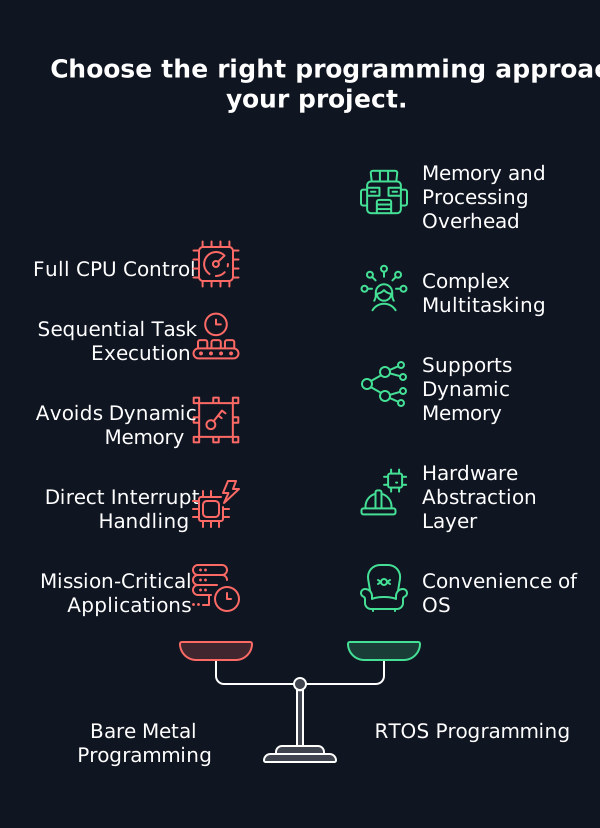
An RTOS introduces memory and processing overhead compared to bare metal, since it needs its own stack space, scheduler, and often a small hardware abstraction layer of its own. In exchange, an RTOS supports complex multi-tasking applications effectively, handling multiple concurrent functions without the developer manually interleaving them. Bare metal applications, by contrast, typically use a simple main loop structure to execute tasks sequentially, and bare metal programming typically lacks multitasking capabilities unless the developer implements some form of scheduling by hand.
This is also why dynamic memory allocation is generally avoided in bare metal programming: without an operating system to manage the heap, allocating and freeing memory at runtime risks fragmentation that can be difficult to recover from on a resource-constrained device. Instead, the developer manages interrupts directly and writes Interrupt Service Routines (ISRs) to handle events like a timer expiring or serial communication data arriving, alongside direct register manipulation for controlling peripherals.
For mission critical applications and other time critical systems, where every clock cycle and every byte of RAM is accounted for, bare metal programming remains the standard, which is why it's commonly used in microcontrollers and safety-critical systems where predictability outweighs the convenience of an operating system.
Getting Started With Bare Metal Programming: InTechHouse Expertise
As we propel AirDron into the future, the synergy with Bare Metal Programming remains a cornerstone. The direct hardware control, efficiency, and deterministic performance offered by Bare Metal Programming align seamlessly with AirDron’s mission to revolutionize air quality monitoring.
The Fusion of AirDron and Bare Metal Programming
- Direct Hardware Interaction: Bare Metal Programming empowers AirDron with direct control over hardware resources, ensuring optimized performance and minimal resource overhead.
- Unparalleled Efficiency: By bypassing the layers of operating systems, Bare Metal Programming enhances AirDron’s efficiency, making it an ideal solution for applications demanding real-time precision.
- Deterministic Performance: In air quality monitoring, where every second counts, Bare Metal Programming provides AirDron with deterministic performance, ensuring timely and predictable data acquisition.
Register-level work rarely stays isolated for long. It grows into bootloaders, drivers, update paths and years of maintenance, and that whole scope is what our team handles as embedded firmware and software development services. The bare metal layer stays the same, the engineering around it is what has to scale.
Debugging Without an Operating System
Debugging bare-metal systems requires both hardware and software tools, since there's no operating system to catch a crash or print a stack trace for you. Debugging without an OS can lead to real challenges in identifying issues: a wild pointer write can silently corrupt the vector table or overwrite your stack with no warning at all.
Using a debugger like Segger Ozone allows for single-stepping through code, setting breakpoints, and inspecting memory directly, which is often the fastest way to confirm that a peripheral register actually holds the value your code just wrote to it. Well-placed debug hooks, such as toggling a spare GPIO pin at key points in your code or routing serial output to a UART for basic logging, simplify troubleshooting considerably compared to relying on a debugger alone. Modular code design also aids in managing debugging complexity, since isolating peripheral drivers, startup code, and application logic into separate functions and source files makes it far easier to narrow down where a fault originated.
We assess your task load, latency requirements and certification path before recommending an architecture. The result is a firmware plan you can hand straight to a development team.
Ask us whether bare metal or an RTOS fits your product
Conclusion
In the intricate tapestry of embedded systems and hardware development, the journey through bare-metal programming unravels a narrative of unparalleled control, efficiency, and precision. Bare-metal programming, with its roots deeply embedded in low-level languages like Assembly and C, offers a pathway where software architects become hardware conductors. From configuring the linker script and vector table to writing the interrupt service routines that keep a device responsive, every step demands a level of full control that higher-level frameworks abstract away. The absence of an operating system layer provides an unfiltered connection to the essence of the machine, allowing for optimized resource utilization and deterministic performance. So, if you are still thinking about bare-metal, we know how to create the best of the best examples for your business. Assembly and C are not the only options, and the trade-offs between programming languages for embedded systems now include Rust and C++ as well.
Let's talk about your next move
Not sure where to start? We work with companies at every stage, from early ideas to enterprise-level builds. A 30-minute call can save you months of guesswork.
FAQ
1. What bare-metal programming is generally ?
Bare-metal programming involves writing software that directly interfaces with hardware, bypassing the abstraction layers of an operating system. This approach provides unparalleled control over system resources, making it a preferred choice in scenarios demanding efficiency and precision.
2. Is bare metal code special?
Indeed, bare metal code is special in its direct interaction with hardware. Unlike higher-level programming, it operates without the intermediary layer of an operating system, making it ideal for applications where low-level control and minimal resource overhead are crucial.Is bare metal popular for embedded applications, too?Yes, bare metal programming is popular in embedded applications. Its efficiency, deterministic performance, and ability to run on resource-constrained devices make it a preferred choice for developing firmware in embedded systems.
3. What is bare machine programming?
Bare machine programming is synonymous with bare-metal programming. It involves writing code that directly controls the hardware components of a computer or embedded system, operating without the assistance of an operating system.
4. Is bare metal high-level language?
Bare metal programming is typically done in low-level languages like Assembly or C. While it's not considered a high-level language, the efficiency and direct hardware control it provides are crucial for certain applications. Bare metal and firmware: What is the difference?Firmware is a term that encompasses both bare-metal programming and higher-level programming with an operating system. While bare-metal programming refers specifically to code running without an operating system, firmware is a broader concept that includes any software that is closely tied to hardware and runs on embedded systems. In essence, all bare-metal programs are firmware, but not all firmware is bare-metal.
5. What's the difference between bare metal programming and using an RTOS?
Bare metal programming runs directly on the CPU with no operating system, giving the developer full control but requiring them to handle interrupts, memory layout, and task sequencing manually, typically through a simple main loop structure. An RTOS adds a scheduler and memory management on top, supporting complex multi-tasking applications at the cost of some memory and processing overhead. The right choice depends on whether the application is simple and time critical, or complex enough to benefit from an operating system's task management.
6. What does a linker script actually do in bare metal programming?
A linker script tells the compiler's linker exactly how to arrange generated code and data across a microcontroller's memory regions, defining the full memory map the final binary will use. It specifies where flash memory sections like the vector table live, where RAM regions like the data section and bss section should be placed, and ensures the compiled output lines up with the real physical memory addresses on the target chip.
Krzysztof Niedźwiedź
Krzysztof Niedźwiedź is a Lead Embedded Systems and Hardware Engineer at InTechHouse with over 11 years of experience developing complex electronic and embedded products from system architecture through production.
He specializes in embedded software development, electronic system architecture, multilayer PCB design, hardware-software integration, system testing, and technical ownership of high-reliability engineering projects. His work spans requirements analysis, architecture and component selection, schematic and PCB design, bare-metal and RTOS firmware development, prototyping, troubleshooting, production documentation, and cooperation with mechanical and high-level software teams.
Krzysztof's project experience includes FPGA and SoC-based onboard computers for the space industry, embedded electronics for advanced optical equipment, low-power environmental-monitoring devices, UAV payloads for real-time air-quality measurement and sample collection, and connected medical and training devices.
He works with C and C++, STM32, LPC and AVR microcontrollers, ARM-based platforms, RTOS, Embedded Linux, FPGA and SoC architectures, DDR3, HDI PCB technology, and industrial communication interfaces including Ethernet, CAN, RS-485, SPI, I2C, UART, USB, Modbus, and MQTT.
Krzysztof holds bachelor's and master's degrees in Electronics and Telecommunications. He is an IPC Certified Interconnect Designer and has completed specialist training in Embedded GNU/Linux kernel internals and device drivers. He writes about embedded system architecture, firmware development, PCB design, MCU and FPGA integration, RTOS, hardware security, low-power electronics, and dependable electronic products.
Let's talk about your next project
From first prototype to production, our engineers can help you scope it, build it and get it certified.


Discuss your product with our R&D team
This initial conversation is focused on understanding your product, technical challenges, and constraints.
No sales pitch - just a practical discussion with experienced engineers.
Share a few details about your product and context. We’ll review the information and suggest the most appropriate next step.