
Conduction Cooling for Electronics in Vacuum: Thermal Design When There Is No Air

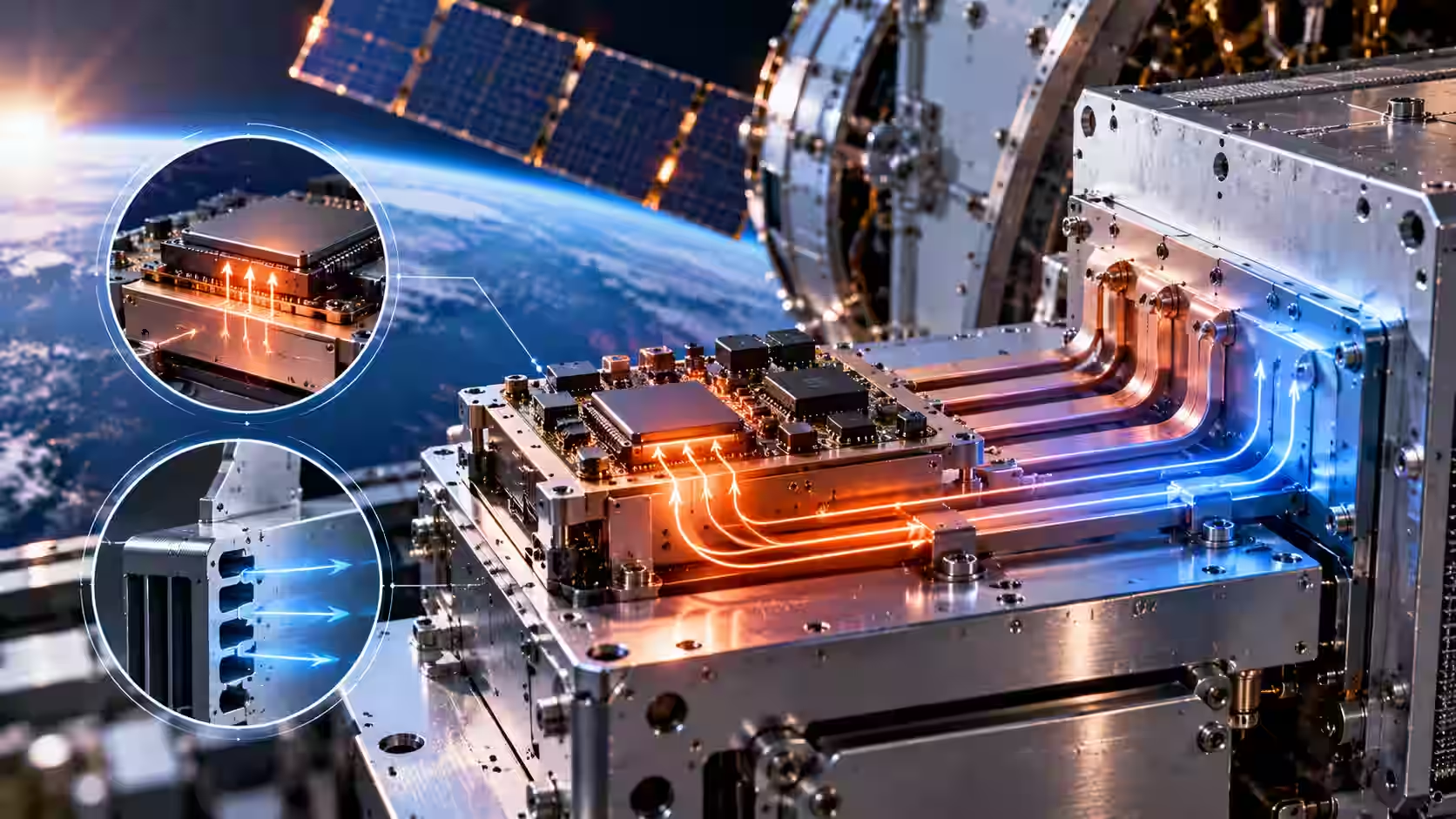
In vacuum there is practically no convection, so electronics are cooled by conduction alone. Verify every component against the declared temperature range at schematic stage, identify the significant heat sources such as DC/DC converters and the FPGA, and connect each to the enclosure through a heatsink or thermal pads so heat can flow to a larger sink.
Key takeaways
- Without air there is no convection, so thermal management in vacuum depends on conduction cooling.
- Start at schematic stage: one component out of a thousand outside the declared temperature range means the unit does not comply.
- Component selection alone does not solve it. DC/DC converters, power supplies and the FPGA generate heat that needs a defined path out.
- Connect every significant heat source to the enclosure through a heatsink or thermal pads, so the heat reaches a larger sink.
- Most thermal-vacuum failures come from an out-of-range part or a heat source with no conduction path.
Conduction, convection and radiation: what still works in vacuum
Heat transfer happens in three ways: conduction, convection and thermal radiation. On the ground, electronic devices rely on all three, and convection does most of the visible work. In vacuum, the picture changes, and that is the core of the thermal challenges for electronic systems in space and near-space. Most thermal management solutions sold for ground equipment, such as fans and vents, assume air is there to transfer thermal energy. Remove the air, and the job of removing heat falls to solid paths alone.
"The target environment can be a vacuum, so there's practically no convection, and radiation is a negligible fraction. Heat transfer is done, and optimized, entirely through conduction."
Adam Szychulec, Vice CTO, InTechHouse
Convection moves heat with a fluid, usually air. Airflow over a hot component carries thermal energy away, and forced convection with fans increases that effect. In vacuum there is no air, so convection stops working, and every cooling system built around air flow stops working with it.
Thermal radiation transfers heat as infrared radiation, with no medium needed. It works in vacuum, but how much it carries depends on temperature and surface area. For the class of unit Adam describes, a compact on-board computer, radiation is a negligible fraction of the heat budget. That is his engineering judgment for this kind of design, not a rule for every spacecraft; large spacecraft use dedicated radiators for exactly this reason.
Conduction moves heat through solid material, always toward the cooler side. It works the same in vacuum as on the ground, which is why it does all the work here. Conduction cooling means designing solid paths with high thermal conductivity that connect every heat source with a place that can absorb or reject that heat.
Conduction vs convection cooling: trade-offs
With no moving parts, conduction cooling also brings reliable operation and little maintenance, which suits aerospace applications and other demanding applications where nobody can service the unit. The trade offs are capacity and weight: conductive material adds mass, and there is a limit to how much excess heat a passive path can carry. A board that has to dissipate more heat needs more copper, larger heat sinks or a better link to the mounting structure, and each of those choices adds weight.
Step 1: check every component against the declared temperature range
Thermal design starts before any heat path exists. If a device is declared for a temperature range, every one of its electronic components has to cover that range. This check happens part by part, at schematic stage.
"You can have a thousand components on the board. If even one is outside the range, you don't comply, and you risk failing the test."
Adam Szychulec, Vice CTO, InTechHouse
The point is not only the main chips. Passive components, connectors and small power parts all have their own ratings, and the weakest one sets the limit for the whole unit. In general practice, engineers also apply derating: running components below their maximum ratings to keep margin, so a part does not operate at the edge of its range for the whole mission. Catching an out-of-range part in the design process costs a line in the bill of materials; catching it in the thermal chamber costs a redesign.
Step 2: find the significant heat sources
Choosing components with the right ratings does not solve the problem on its own. Some parts generate heat in operation, and that heat has to go somewhere.
The usual significant heat sources on an on-board computer are:
- DC/DC converters and power supplies, which turn part of the energy they handle into waste heat.
- The FPGA itself, especially when much of the logic is active.
- Other heat-generating parts, such as processors, memory and drivers.
Map these hot spots early. Each one needs a defined path to dissipate its heat; without it, the part runs hotter than its neighbors, and in vacuum nothing around it will carry that heat away by chance.
Step 3: give every heat source a conduction path to the enclosure
Once the heat sources are known, connect each one to the enclosure.
"Every element that generates significant heat should be connected to the enclosure (through a heatsink or thermal pads) so the energy can be transferred on."
Adam Szychulec, Vice CTO, InTechHouse
In practice, that path is built from:
- Heat sinks on the hottest parts, mechanically linked to the enclosure.
- Thermal pads, or other thermal interface materials, which fill the air gaps between surfaces that would otherwise block heat transfer.
- The PCB itself, using copper planes and thermal vias to conduct heat away from a component.
- The enclosure, which spreads the heat and passes it on to a larger heat sink: the structure the unit is mounted on.
Heat pipes and cold plates are other thermal solutions engineers use to transfer heat over longer distances or to concentrate it at a mounting point. Whatever the components, the rule is the same: every watt that enters the board must have a solid route out to a lower temperature.
The enclosure is the heat path
In vacuum, the enclosure is not only mechanical protection; it is the main part of the cooling system. Its thermal properties, its contact with the board and its contact with the mounting structure decide how much heat the overall system can reject.
That is why the enclosure belongs in the electronics design from the start. On Latitude's on-board computer, InTechHouse designed the enclosure together with the hardware, for the qualification tests and for vibration. A mechanically stiff, well-designed electronics enclosure can also be a good thermal one, but only if both functions are considered together in system development. For the mechanical side, see our article on launch vehicle electronics design.
Why electronics fail thermal-vacuum testing
Thermal-vacuum testing is one of the environmental tests in on-board computer qualification of this kind. Two causes explain most failures:
- An out-of-range part. One component that cannot cover the declared temperature range fails the whole unit, however good the rest of the design is.
- A heat source with no conduction path. A component that relied, often without anyone noticing, on air flow on the bench overheats once the chamber removes the air.
Both are design problems, and both are cheaper to find at schematic stage than in the chamber. For where TVAC fits in the full campaign, see our guide to on-board computer qualification, or read more about thermal vacuum testing.
Materials and outgassing
Vacuum also affects materials. Some plastics, adhesives, coatings and thermal interface materials release gas in vacuum (outgassing). The released material can condense on nearby surfaces, such as optics or connectors, and the material itself can lose some of its properties. Choosing materials suitable for vacuum is part of effective thermal management, along with the heat paths themselves. For thermal management on the ground, where air flow and active solutions are available, see our article on thermal management in PCB design.
Let's talk about your next move
Not sure where to start? We work with companies at every stage, from early ideas to enterprise-level builds. A 30-minute call can save you months of guesswork.
FAQ
How do you cool electronics in a vacuum?
Cool them by conduction. In vacuum there is practically no convection, so check every component against the declared temperature range, identify heat sources such as DC/DC converters and the FPGA, and connect each to the enclosure through a heatsink or thermal pads. The enclosure then passes the heat on to a larger heat sink.
Can you dissipate heat in a vacuum?
Yes. Heat still moves by conduction through solid materials and by thermal radiation, which needs no medium. Only convection stops, because there is no air. For a compact on-board computer, conduction to the enclosure and its mounting structure carries most of the heat; large spacecraft also use dedicated radiators.
What is the difference between conduction and convection cooling?
Conduction moves heat through solid material, such as a heatsink, thermal pad or enclosure, and works in vacuum. Convection moves heat with a fluid, usually air, sometimes with fans for forced convection, and stops working without air. Conduction cooling has no moving parts but limited capacity and added weight.
Why do electronics fail thermal-vacuum testing?
Two common causes: a component rated outside the declared temperature range, and a heat source with no conduction path to the enclosure. On the bench, air flow can hide the second problem; in the vacuum chamber, the part overheats. Both are design issues best caught at schematic stage, before testing.
How do you thermally design an FPGA board for space or near-space?
Treat the FPGA as a significant heat source from the start. Check every component against the temperature range, map heat sources including the FPGA and DC/DC converters, and give each a conduction path to the enclosure through a heatsink or thermal pads. Design the enclosure as part of the heat path.
Adam Szychulec
Adam Szychulec is Deputy CTO at InTechHouse and an electronics and embedded systems engineer with over 13 years of experience in hardware development, FPGA-based systems, embedded software, and technical leadership.
He specializes in electronic system architecture, analog and digital PCB design, FPGA and SoC development, embedded C/C++ software, and managing the complete lifecycle of complex engineering products - from early feasibility studies and technical architecture through development, testing, production introduction, and product modernization.
Adam has extensive experience leading multidisciplinary R&D teams and coordinating electronics, embedded software, mechanical engineering, testing, and project delivery. His responsibilities have included technical decision-making, project planning, risk and change management, budgeting, product testing, new product introduction, and mid-life upgrades of existing electronic systems.
His project experience includes FPGA modules for space applications, electronic systems and payloads for unmanned aerial vehicles, environmental monitoring and multispectral imaging platforms, power electronics, DC-DC converter assessment, and embedded systems developed for demanding industrial and defence-related applications.
Adam works with FPGA and SoC platforms, Xilinx Zynq, VHDL, Vivado, Altium Designer, ARM microcontrollers, embedded C/C++, Linux, digital electronics, and power electronics. He holds bachelor's and master's degrees in Electrical Engineering and is an IPC Certified Interconnect Designer. He writes about FPGA architectures, electronics design, embedded systems, hardware product development, technical risk management, UAV electronics, power electronics, and engineering leadership.
Let's talk about your next project
From first prototype to production, our engineers can help you scope it, build it and get it certified.

Designing On-Board Computer Hardware for a Launch Vehicle: Vibration, Shock and Low Pressure
%20in%20an%20FPGA.avif)
Precision Time Protocol (PTP v2) in an FPGA: Hardware Time Synchronization, GPS Discipline and Accuracy
On-Board Computer Architecture with an FPGA SoC: Adding Hardware Functions After the PCB Is Frozen


Discuss your product with our R&D team
This initial conversation is focused on understanding your product, technical challenges, and constraints.
No sales pitch - just a practical discussion with experienced engineers.
Share a few details about your product and context. We’ll review the information and suggest the most appropriate next step.